My Site

WANT TO BREAK FREE FROM THE MODERN DAY INCOME?
COME ALONG AND EARN MONEY FROM JUST YOUR FINGERTIPS.
JOIN OUR FREE TELEGRAM GROUP WHERE HUNDREDS ARE LEARNING THE TRADING SYSTEM WITH CONFIDENCE FULLY SUPPORTED BY OUR SUPPORT TEAM!
STEP BY STEP TO GET INVOLVED...
MAKE SURE WHEN OPENING AN ACCOUNT YOU TICK THE BOXES AND CLICK 'PROCEED'
DO NOT CLICK THE ORANGE BOX WHICH SAYS FCA.
£500–£50,000 deposit · 150% bonus (first £1,000, T&Cs) · MT5 only
1) Start With the Referral Link
Open the link above to reach Vantage Markets. Confirm the address begins with https://www.vantagemarkets.com

2) Create Your Account
Fill in your email and password, select your country, choose Individual, and verify your email.
MAKE SURE WHEN IT ASKS REFFERED BY YOU PUT "08INxnB0"


Tap PROCEED (top orange button). Do not choose the lower FCA redirect button.
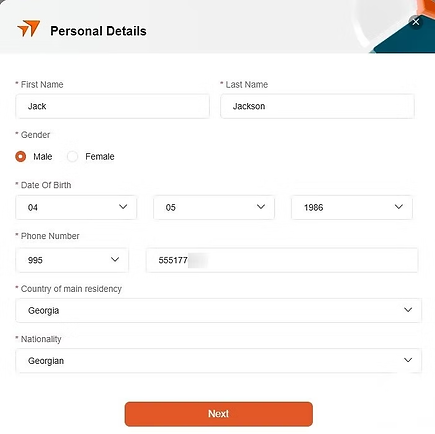
Fill out all your details, and make sure you have some ID to hand
preferably your passport for the next step.
3) Trading Account (MT5 · GBP)
Platform: MetaTrader 5 (MT5 only)
Type: Standard STPBase
Currency: GBP (£)

4) Verify Your Identity (KYC)
Upload government ID and recent proof of address (3–6 months).
Ensure bright, clear photos and matching details.

5) Opt‑In and Deposit
In Promotions, opt in to the 150% Deposit Bonus before funding. If the bonus doesn’t appear after deposit, go back and press Redeem Bonus.

Funding: Go to Funds → Deposit Funds, choose your method, and deposit your amount.
Minimum deposit is £500 up to £50,000.
Bonuses only apply to the first £1,000 — please read the terms and conditions.

6) Connect to MT5Mobile:
MT5 → Manage Accounts → + → Login to an Existing Account → search “Vantage” → select your Live server → login with your account number & password.


What you’ll receive: After approval, Vantage emails your MT5 Login (account number), Password, and the correct Live Server.
* Mobile (iOS/Android): MT5 → Menu → Manage Accounts → + → Login to an Existing Account → search “Vantage Markets” → select your Live server → enter Login & Password → Login.
* Desktop: MT5 → File → Login to Trade Account → choose your Vantage Live server → enter Login & Password → Login
* .Servers: Use the exact server name from the email (e.g., VantageInternational‑Live). Picking a different server will cause “invalid account.”
Desktop: Download MT5 → File → Login to Trade Account → choose the correct Vantage Live server → enter login & password.

⚠️ Risk Warning: Trading CFDs involves risk and can lead to loss of capital. Only trade with funds you can afford to lose.
Setting Up Meta5 and Understanding Signals
This is a complete, step‑by‑step guide showing how to take signals from the BT VIP Telegram group and use them on MetaTrader 5 (MT5) on your phone — from reading entries to setting SL/TP and executing with one‑tap.
When you first open MetaTrader, it’s best to do a quick clean-up — remove any unnecessary symbols to keep your Quotes screen tidy and focused.
Your Quotes are at the bottom. When tapped, you'll see this screen — now click on the pen icon in the top-right to manage your symbols.

Click the trash icon to be able to select the symbols.

Select all the boxes, then tap the trash icon again to remove them. You might notice one symbol that stays — that’s completely normal and nothing to worry about.

This is how your screen should look. Now tap the plus icon at the top to add XAUUSD.

Type XAUUSD in the search bar to find the gold pair you’ll be trading. Tap the blue plus icon next to it to add it to your list. Once you’ve done that, press the arrow (top-left) to exit this screen.

Tap on XAUUSD, then select Chart to open the trading chart — this is where you’ll analyze the market and place trades.

You’re now on the trading chart — this is where you’ll analyze price and place trades. Candlesticks show price movement over time, and the top bar gives quick access to tools. Tap One‑Tap Trading to enable instant order placement.

One‑Tap Trading lets you place trades instantly with a single tap — no confirmation box appears.
The SELL and BUY panels at the top show real‑time prices for your selected symbol.
• SELL (left) opens a short trade — you profit if price falls.
• BUY (right) opens a long trade — you profit if price rises.
Set your Lot Size (middle) before tapping. Use the small arrows to adjust the size — higher values mean larger position size and larger potential profit/loss.
For safety, beginners can start with 0.01 lots.
Once One‑Tap Trading is enabled, tapping either panel sends the order immediately at the current market price — double‑check symbol and lot size first.
You can disable One‑Tap Trading in Settings anytime to restore the confirmation step before orders.

Trades shows your active trades.
This is where you can either
- Modify to adjust stop loss and take profit
- Close Trade at the current position
(Hold down on the trade to open the menu)

History shows you your previous trades including - Rate you bought in at - Rate you sold at - Amount of profit/loss
Signals
Once you have completed your set up and credited your Vantage account with minimum £500 you will be added to the signals group on Telegram Messenger (Please make sure you download this from the App Store (Insert Telegram Messenger photo with link).
You will receive on average 8-10 signals per day Monday to Friday (Gold market is closed at the weekend)

This is what a signal will look like:-
The numbers at the top 4204.5-4200 show the entry zone.
This is the price gold should be showing within your MT5 app on your chart when you buy in.
- We buy 3 entries within this zone - new starters should only ever be using a 0.01 lot size
- We then go to the trades tab, hold down on the active trade and click ‘modify’
- Add the Stop Loss (SL) shown in the image 4195 (This limits your loss if the signal doesn’t go the way our traders thought it would)
- Set each of the three trades with a different Take Profit (TP) TP1, TP2 and TP3 (This means that each of the three trades will cash out when they reach a slightly higher profit.
(Please be aware that all trades carry a risk and no genuine signal group can promise 100% accurate signals)

You will then receive notifications like this confirming that gold has risen to the price shown for TP1 and your first trade set with TP1 should have cashed out.
The same for TP2 which followed shortly after.
The market moves rapid, sometimes this can happen in a matter of seconds so it’s important that you modify your trades quickly.
Please Read Carefully
You’re now ready to start taking your first signals from BT VIP on Telegram and using them on MetaTrader 5. This is where your trading journey truly begins. From here, discipline and control will make all the difference.
Trading isn’t about luck — it’s about execution and mindset. Emotions such as greed, fear, or frustration can cause impulsive mistakes. Never chase a loss or overtrade because of a winning streak. Each trade is independent — follow the signal, execute precisely, and let the market play out.
Keep your lot size small and manageable. If your account balance is around £500, trade with a maximum of 0.05 lots, or start smaller with 0.01 lots while you’re still learning. The goal at this stage isn’t to make fast profits — it’s to build confidence, consistency, and control.
As you begin applying the BT VIP signals, focus on understanding why trades move and how markets react. Over time, this awareness becomes your edge.
Your goal now is consistency, not speed — trade smart, stay patient, and trust the process.
Tip:
Change your Telegram notification tone to something unique so you instantly know when a new BT VIP signal comes through — every second counts when entering trades
Now you’re all set up. The next step is simple — just wait for a signal.When you hear the notification, open Telegram — your signal will look like what is shown above in the last photo with TP1, TP2, TP3, TP4, TP5.


Disclaimer - Superior Gold Trading operates solely as an independent affiliate under Vantage and in partnership with BT VIP. All trading signals, strategies, and related market information are created, owned, and distributed by BT VIP and its affiliated Group. Superior Gold does not provide financial advice, trading guidance, or investment services and accepts no responsibility or liability for any trading decisions, outcomes, or losses arising from the use of information supplied by BT VIP. Trading leveraged products carries a high level of risk and may not be suitable for all investors. Participants should conduct their own research and seek independent financial advice before engaging in any form of trading.